CryptokiMan Installation on Linux
These steps follow the Linux installation screenshot and use the CryptokiMan 2.3.2 ZIP package.
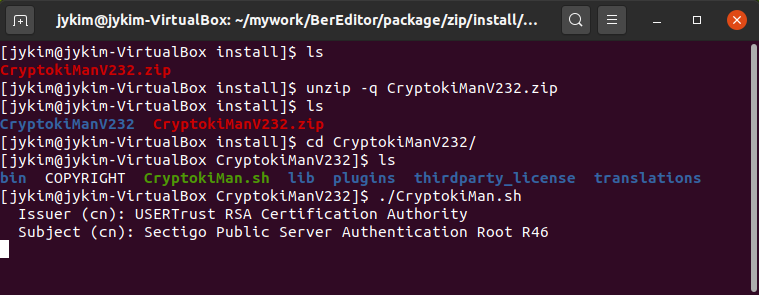
Extract the archive and start CryptokiMan from a terminal.
Download and extract
Download the CryptokiMan 2.3.2 Linux package and open a terminal in the directory containing the downloaded ZIP file. Then run:
unzip -q CryptokiManV232.zip
cd CryptokiManV232
Check that the extracted directory contains CryptokiMan.sh:
ls
Start CryptokiMan
Run the launcher from the extracted directory:
./CryptokiMan.sh
The first launch may display certificate information and ask for input. The screenshot shows these values:
- Issuer (CN): USERTrust RSA Certification Authority
- Subject (CN): Sectigo Public Server Authentication Root R46
Review the prompt and certificate details before responding. Follow the exact instructions shown in your terminal; the screenshot does not show the final prompt or response.
Troubleshooting
- If
unzipcannot find the archive, change to the directory where the ZIP file was downloaded or use its full path. - If
./CryptokiMan.shreports “Permission denied,” make the launcher executable and try again:
bash
  chmod +x CryptokiMan.sh
  ./CryptokiMan.sh
- If startup reports a missing library, install the required runtime package for your Linux distribution and architecture, then run the launcher again.