Settings Dialog
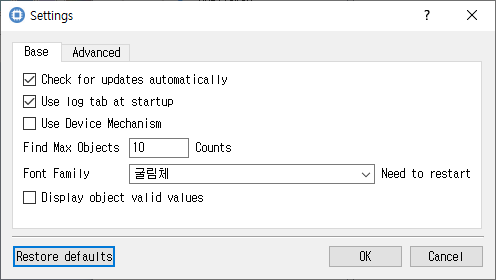
Application preferences for display, logging, and operations.
Purpose
Configures CryptokiMan preferences for logging, display, language, file reading, object searches, and update checks.
Fields and controls
| Control | Description |
|---|---|
| Find Max Objects | Input or information related to Find Max Objects for the current dialog operation. |
| Counts | Input or information related to Counts for the current dialog operation. |
| Font Family | Input or information related to Font Family for the current dialog operation. |
| Need to restart | Input or information related to Need to restart for the current dialog operation. |
| Language (need restart ) | Input or information related to Language (need restart ) for the current dialog operation. |
| Characters | Input or information related to Characters for the current dialog operation. |
| Use fixed hex area | Input or information related to Use fixed hex area for the current dialog operation. |
| Log Level | Input or information related to Log Level for the current dialog operation. |
| The size of the file to be read at one time | Input or information related to The size of the file to be read at one time for the current dialog operation. |
| File Read Size | Input or information related to File Read Size for the current dialog operation. |
| Restore defaults | Input or information related to Restore defaults for the current dialog operation. |
Object and operation attributes
These checkboxes configure the object template or operation. Their effect depends on token capabilities and permissions.
| Option | Meaning |
|---|---|
| Check for updates automatically | Sets the corresponding Check for updates automatically attribute or option for the operation. |
| Use log tab at startup | Sets the corresponding Use log tab at startup attribute or option for the operation. |
| Use Device Mechanism | Sets the corresponding Use Device Mechanism attribute or option for the operation. |
| Display object valid values | Sets the corresponding Display object valid values attribute or option for the operation. |
Notes
Use the selected slot and session shown in Slot Info. Results depend on the PKCS #11 module, token support, object permissions, and entered values. CryptokiMan and/or the module reports operation errors.