Import Certificate Dialog
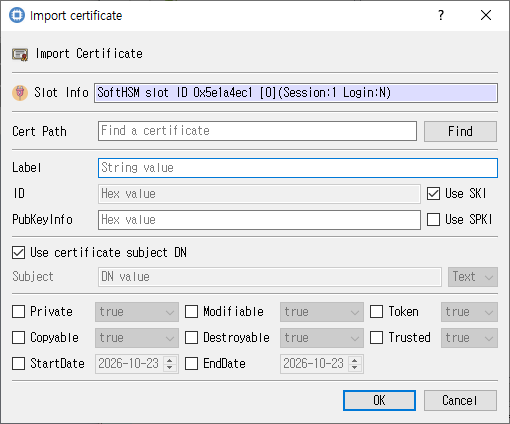
Certificate file selection and imported-object attributes.
Purpose
Loads a certificate file and creates a certificate object on the selected token with the chosen attributes.
Fields and controls
| Control | Description |
|---|---|
| Import Certificate | Input or information related to Import Certificate for the current dialog operation. |
| Slot Info | Read-only information identifying the selected token slot. |
| Cert Path | Path to the certificate file. |
| ID | Object identifier used to associate or locate objects. |
| Label | Human-readable label assigned to an object or key. |
| PubKeyInfo | Input or information related to PubKeyInfo for the current dialog operation. |
| Subject | Subject name associated with the key or certificate. |
Object and operation attributes
These checkboxes configure the object template or operation. Their effect depends on token capabilities and permissions.
| Option | Meaning |
|---|---|
| Use SKI | Sets the corresponding Use SKI attribute or option for the operation. |
| Use SPKI | Sets the corresponding Use SPKI attribute or option for the operation. |
| Use certificate subject DN | Sets the corresponding Use certificate subject DN attribute or option for the operation. |
| Private | Marks an object private, subject to token login and policy. |
| Modifiable | Allows object attributes to be modified. |
| Token | When checked, stores the object as a token object; otherwise it is session-scoped. |
| Copyable | Allows the object to be copied. |
| Destroyable | Allows the object to be destroyed. |
| Trusted | Marks a public key as trusted where supported. |
| StartDate | Sets the corresponding StartDate attribute or option for the operation. |
| EndDate | Sets the corresponding EndDate attribute or option for the operation. |
Typical use
Browse to a certificate file, review its subject and identifiers, set object attributes, and import it.
Notes
Use the selected slot and session shown in Slot Info. Results depend on the PKCS #11 module, token support, object permissions, and entered values. CryptokiMan and/or the module reports operation errors.