Import PFX Dialog
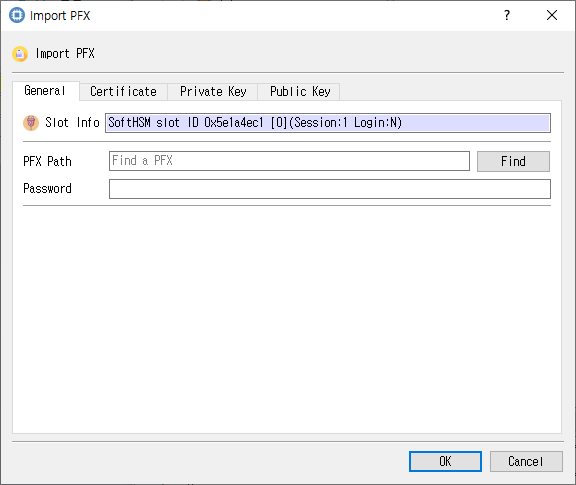
PFX file, password, and certificate/key attributes.
Purpose
Imports a PKCS #12/PFX file and configures the certificate, private-key, and public-key objects extracted from it.
Fields and controls
| Control | Description |
|---|---|
| Import PFX | Input or information related to Import PFX for the current dialog operation. |
| Slot Info | Read-only information identifying the selected token slot. |
| PFX Path | Path to the PKCS #12/PFX file. |
| Password | Password used to access or decrypt the selected input file. |
| Certificate Attributes | Input or information related to Certificate Attributes for the current dialog operation. |
| Label | Human-readable label assigned to an object or key. |
| ID | Object identifier used to associate or locate objects. |
| PubKeyInfo | Input or information related to PubKeyInfo for the current dialog operation. |
| Same Label | Input or information related to Same Label for the current dialog operation. |
| Subject | Subject name associated with the key or certificate. |
| Private Key Attributes | Input or information related to Private Key Attributes for the current dialog operation. |
| Public Key Attributes | Input or information related to Public Key Attributes for the current dialog operation. |
Object and operation attributes
These checkboxes configure the object template or operation. Their effect depends on token capabilities and permissions.
| Option | Meaning |
|---|---|
| Use SKI | Sets the corresponding Use SKI attribute or option for the operation. |
| Use SPKI | Sets the corresponding Use SPKI attribute or option for the operation. |
| Use certificate subject DN | Sets the corresponding Use certificate subject DN attribute or option for the operation. |
| Private | Marks an object private, subject to token login and policy. |
| Modifiable | Allows object attributes to be modified. |
| Token | When checked, stores the object as a token object; otherwise it is session-scoped. |
| Trusted | Marks a public key as trusted where supported. |
| StartDate | Sets the corresponding StartDate attribute or option for the operation. |
| Copyable | Allows the object to be copied. |
| EndDate | Sets the corresponding EndDate attribute or option for the operation. |
| Destroyable | Allows the object to be destroyed. |
| Unwrap | Permits unwrapping keys. |
| Decrypt | Permits decryption with this key. |
| Sign | Permits signing with this key. |
| Derive | Permits deriving other keys. |
| SignRecover | Sets the corresponding SignRecover attribute or option for the operation. |
| Extractable | Allows key material to be extracted when permitted by token policy. |
| Sensitive | Marks private or secret key material as sensitive. |
| VerifyRecover | Sets the corresponding VerifyRecover attribute or option for the operation. |
| Verify | Permits signature verification with this key. |
| Encrypt | Permits encryption with this key. |
| Wrap | Permits wrapping other keys. |
Typical use
Select a PFX file and enter its password, configure certificate and key attributes, and import its contents.
Notes
Use the selected slot and session shown in Slot Info. Results depend on the PKCS #11 module, token support, object permissions, and entered values. CryptokiMan and/or the module reports operation errors.