Open Session Dialog
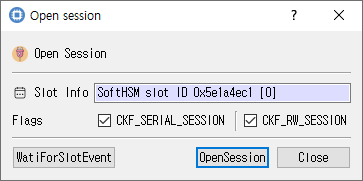
Slot selection and flags for opening a session.
Purpose
Opens a PKCS #11 session on the selected slot. A session is required for most token operations, including login and object management.
Fields and options
| Control | Description |
|---|---|
| Slot Info | Read-only information for the selected slot. |
| CKF_SERIAL_SESSION | Requests a serial session. Checked by default. |
| CKF_RW_SESSION | Requests a read/write session. Checked by default; clear it to request read-only access. |
Buttons
| Button | Description |
|---|---|
| WaitForSlotEvent | Calls the module's slot-event function and displays the return code. The UI currently spells this WatiForSlotEvent. |
| OpenSession | Opens the session using the selected slot and flags. On success the session handle is recorded and the dialog closes; on failure an error is shown. |
| Close | Closes the dialog without opening a session. |
Typical use
Select a slot in the main window, open Module > Open Session, choose the session flags, and click OpenSession. The module determines the exact behavior of the slot-event call.