Login Dialog
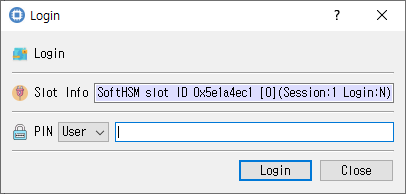
Role selection and PIN entry for token login.
Purpose
Authenticates to the selected token through an open session (C_Login). Authentication may be required to access private objects or perform protected operations.
Fields
| Field | Description |
|---|---|
| Slot Info | Read-only information identifying the selected slot/token. |
| Login type | Select SO (Security Officer) or User. User is selected by default. |
| PIN | PIN for the selected role. Input is masked. |
Buttons
| Button | Description |
|---|---|
| Login | Submits the selected role and PIN. On success, CryptokiMan records the logged-in state and closes the dialog. |
| Close | Closes without logging in. |
An open session is required, and the PIN cannot be empty. If authentication fails, an error is reported and the PIN field is cleared.