Create CSR Dialog
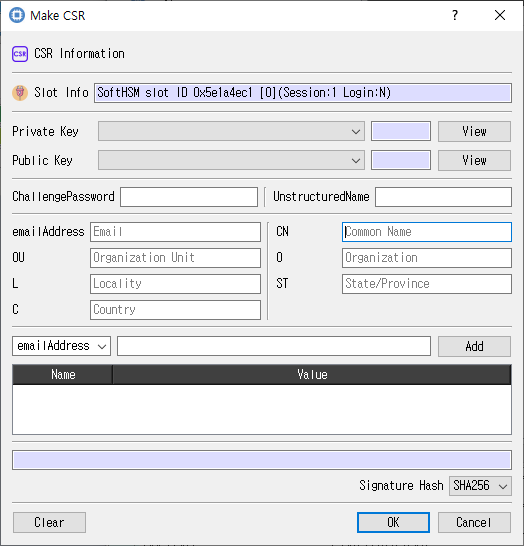
Key selection and subject fields for a certificate request.
Purpose
Builds a certificate signing request using a key pair and the supplied subject and request attributes.
Fields and controls
| Control | Description |
|---|---|
| CSR Information | Input or information related to CSR Information for the current dialog operation. |
| Slot Info | Read-only information identifying the selected token slot. |
| Public Key | Input or information related to Public Key for the current dialog operation. |
| Private Key | Input or information related to Private Key for the current dialog operation. |
| ChallengePassword | Input or information related to ChallengePassword for the current dialog operation. |
| UnstructuredName | Input or information related to UnstructuredName for the current dialog operation. |
| L | Input or information related to L for the current dialog operation. |
| CN | Input or information related to CN for the current dialog operation. |
| C | Input or information related to C for the current dialog operation. |
| ST | Input or information related to ST for the current dialog operation. |
| emailAddress | Input or information related to emailAddress for the current dialog operation. |
| O | Input or information related to O for the current dialog operation. |
| OU | Input or information related to OU for the current dialog operation. |
| Add | Input or information related to Add for the current dialog operation. |
| Signature Hash | Input or information related to Signature Hash for the current dialog operation. |
Typical use
Select the public and private keys, enter subject fields, choose a signature hash, and submit the CSR request.
Notes
Use the selected slot and session shown in Slot Info. Results depend on the PKCS #11 module, token support, object permissions, and entered values. CryptokiMan and/or the module reports operation errors.