Certificate Information
The Certificate Information dialog displays the fields and extensions in an X.509 certificate, provides certificate path and status checks, and offers certificate export and management actions.
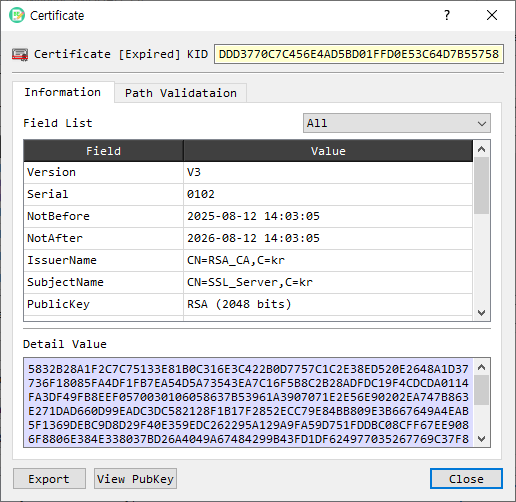
Certificate overview
The header identifies the certificate and displays its KID (Key Identifier) when available. The Information tab presents parsed fields in a table. Select a row to see its value in Detail Value. The Field List filter can show all fields, version 1 fields, extensions, critical extensions, or attributes. Use View PubKey to inspect the certificate's public key.
Certificate path
The Path Validation tab shows the certificate path tree and related path information. Select a certificate in the tree to inspect it or open its context actions. The available controls include:
| Control | Description |
|---|---|
| Make Tree | Builds a certificate path tree. |
| Cert PVD | Runs certificate path validation. |
| Get CA | Retrieves the CA certificate associated with this certificate and opens its information. |
| Save to CA | Saves the CA certificate to the CA store. |
| Save to Man | Saves the certificate to CertMan. |
| Save To RCA | Saves the certificate as a trusted root CA. |
| Verify Cert | Verifies the certificate signature. |
| CRL Check | Checks whether the certificate is revoked using a CRL. |
| OCSP Check | Checks certificate status with an OCSP server. |
| OCSP Client | Opens the OCSP client. |
| GetURL CA / GetURL CRL | Retrieves the CA or CRL distribution URL from the certificate. |
| Get CRL | Retrieves the CRL and opens its information. |
| Decode Cert | Decodes the certificate in the main BerEditor view. |
Some path and CertMan actions are available only in the licensed version.
Export and other actions
- Export saves the certificate in PEM format.
- View PubKey opens the public key information dialog.
- Close closes the certificate information dialog.
Review a certificate
- Open a certificate in BerEditor's certificate information dialog.
- Review its parsed fields in Information. Select fields to inspect their detailed values; adjust Field List to narrow the table.
- To inspect trust or revocation, open Path Validation and use Make Tree, Cert PVD, Verify Cert, CRL Check, or OCSP Check as appropriate.
- Use Export to save a PEM copy, or Save to Man / CA controls to add it to the relevant store.