Content Help
The Content Help window provides ASN.1 and PKI reference material, RFC documents, and managed web links. Select an item in the information tree to display its content.
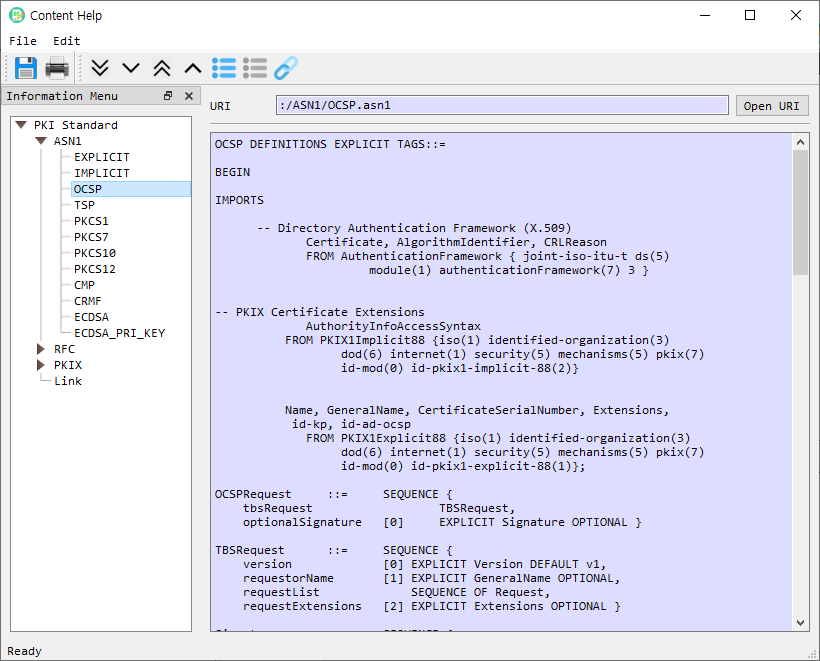
Main areas
| Area | Description |
|---|---|
| Information Menu | Tree of ASN.1 references, RFCs, PKIX documents, and managed links. The menu can be shown or hidden from the Edit toolbar/menu. |
| Content pane | Displays the selected reference, locally available document, or retrieved web content. |
| URI | Shows the address associated with the selected online item or the resource path for a built-in reference. |
| Open URI | Opens an HTTP or HTTPS address in the system browser. |
The tree is populated for licensed installations. RFC and PKIX pages are retrieved from the configured reference sites and cached locally after the first load. Built-in ASN.1 references are loaded from application resources. Managed links are configured through Link Manage.
Browse references
- Expand a category in Information Menu.
- Select an item to show its content in the content pane.
- For an online reference, review the displayed URI and select Open URI to open it in the system browser.
- Use Find to search within the displayed content.
Toolbar and menu actions
- Save saves the selected reference to a file.
- Print and Print Preview print the displayed content.
- Expand All / Expand Node and Collapse All / Collapse Node control the tree.
- Show Menu / Hide Menu toggles the information tree.
- Link Manage opens the link manager for maintaining custom links.
- Quit closes the Content Help window.
Keyboard shortcuts are shown in the corresponding application menu. The toolbar includes shortcuts for Save (Ctrl+1), Print (Ctrl+2), Expand All (Ctrl+4), Expand Node (Ctrl+5), Collapse All (Ctrl+6), Collapse Node (Ctrl+7), Show Menu (Ctrl+8), Hide Menu (Ctrl+9), and Link Manage (Ctrl+A).