CRL Information
The CRL Information dialog displays the metadata and revoked-certificate entries in an X.509 Certificate Revocation List (CRL). It also provides signature verification, decoding, export, and CertMan actions.
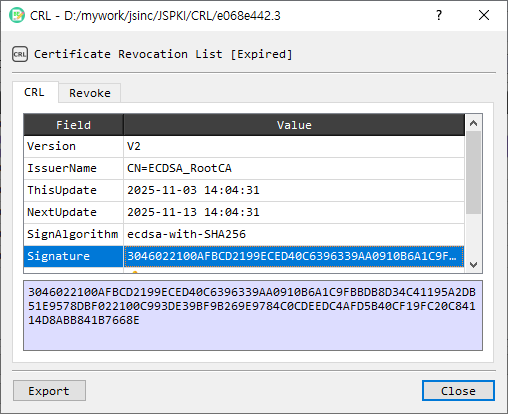
CRL tab
The CRL tab lists parsed CRL fields in a Field / Value table. Select a field to view its value in the detail area below the table.
Revoke tab
The Revoke tab lists revoked certificates by Serial and RevokedDate. Select an entry to display its serial number, revocation date, and available revocation details in the detail table.
Actions
| Control | Description |
|---|---|
| Verify CRL | Verifies the CRL signature. |
| Decode CRL | Decodes the CRL in the main BerEditor view. |
| Save to CertMan | Saves the CRL to CertMan. This control is available in licensed mode. |
| Export | Exports the CRL as a PEM file. |
| Close | Closes the dialog. |
Inspect or export a CRL
- Open a CRL in the CRL Information dialog.
- Review the metadata on the CRL tab, or select Revoke to inspect revoked entries.
- Select an entry to view its details.
- Select Verify CRL to check its signature, or Decode CRL to inspect the encoded structure in the main window.
- Select Export to save a PEM copy. In licensed mode, use Save to CertMan to store the CRL there.