CA Manager Dialog Guide
This guide explains the CA Man dialog, titled CA Management. Open it from Tools > CA Manager (Shift+F11). The dialog lets you browse and manage CA certificates, key pairs, and certificate signing requests (CSRs), or select one of these items when another workflow requests it.
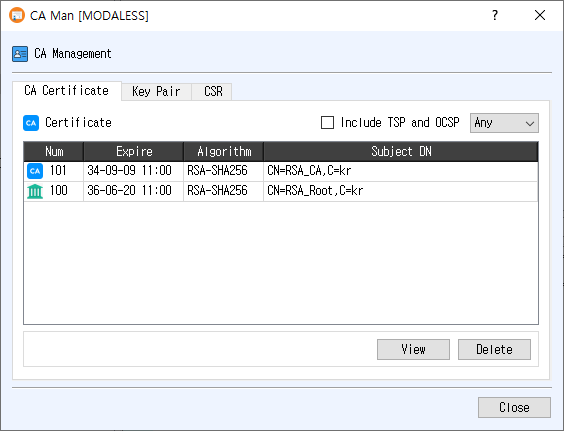
Management mode
In management mode, use the CA Certificate, Key Pair, and CSR tabs to view or delete database records. Select a row, then click View or Delete. The same actions are available from the table's right-click menu; double-clicking a row opens its details.
CA Certificate tab
| Control / column | Purpose |
|---|---|
| Include TSP and OCSP | Switch the list to signer certificates used for TSP/OCSP, in addition to the issuer certificate list. |
| Algorithm filter | Show Any, RSA, ECDSA, DSA, EdDSA, SM2, ML-DSA, or SLH-DSA certificates. |
| Num | Database certificate record number. |
| Expire | Certificate expiration time. |
| Algorithm | Certificate signature algorithm. |
| Subject DN | Certificate subject distinguished name. |
| View | Open certificate details. |
| Delete | Ask for confirmation, then delete the selected certificate record. |
Key Pair tab
| Control / column | Purpose |
|---|---|
| Status filter | Show key pairs with NotUsed or Used status. |
| Algorithm filter | Filter by Any, RSA, ECDSA, DSA, EdDSA, SM2, ML-DSA, or SLH-DSA. |
| Num | Database key-pair record number. |
| RegTime | Key-pair registration time. |
| Algorithm | Key-pair algorithm. |
| Name | Key-pair name. |
| View | Open private-key information for the selected key pair. |
| Delete | Ask for confirmation, then delete the selected key-pair record. |
CSR tab
| Control / column | Purpose |
|---|---|
| Status filter | Show CSRs with NotUsed or Used status. |
| Algorithm filter | Filter by Any, RSA, ECDSA, DSA, EdDSA, SM2, ML-DSA, or SLH-DSA. |
| Num | CSR record number. |
| RegTime | CSR registration time. |
| Subject DN | Subject distinguished name from the request. |
| Name | CSR name. |
| View | Open CSR details. |
| Delete | Ask for confirmation, then delete the selected CSR record. |
Changing a filter reloads that tab's list. Table rows cannot be edited directly.
Selection mode
Other CertMan dialogs use CA Manager as a picker for a CA certificate, key pair, or CSR. In selection mode, only the relevant tab is enabled, management buttons are hidden, and OK is shown. Select a row and click OK, or double-click the row, to return the selected database record number to the calling dialog. Use Close to exit without choosing an item.
Notes
- The dialog requires an open database.
- Delete actions ask for confirmation and remove the selected database record. Check dependencies before deleting certificates or key pairs used by other records.
- The Include TSP and OCSP checkbox affects the certificate list; it is not an algorithm filter.
Related implementation
This guide is based on images/ca_man_dlg.png, src/CertMan/ca_man_dlg.ui, src/CertMan/ca_man_dlg.h, and src/CertMan/ca_man_dlg.cpp.