Profile Manager Manual
The Profile Manager displays the certificate, CSR, and CRL profiles saved in the current CertMan database. In management mode, you can inspect a profile or delete it. Create or modify profiles through the corresponding profile creation tools.
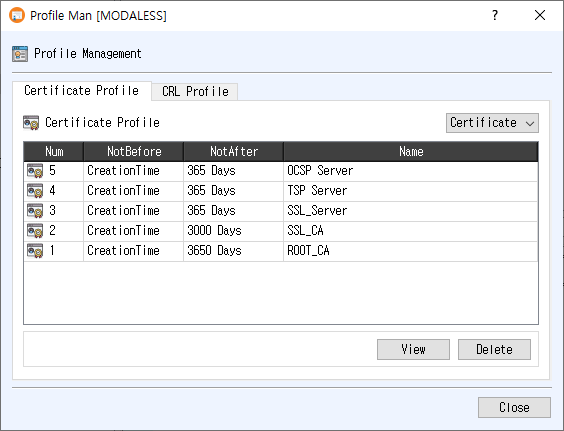
Open the dialog
Choose Tools > Profile Manager from the main window. The manager opens as a modeless window, so you can return to the main window while it remains open.
Certificate Profile tab
The Certificate Profile tab lists certificate and CSR profiles. Use the selector at the upper right to switch between Certificate and CSR profiles. The table shows:
- Num: profile record number.
- NotBefore and NotAfter: the configured validity period.
- Name: profile name.
Select a row, then click View to open the profile details. You can also double-click a row or right-click the table and choose View. To remove the selected profile, click Delete or use the right-click Delete command, then confirm the prompt. The list refreshes after a successful deletion.
CRL Profile tab
The CRL Profile tab lists saved CRL profiles. The table shows the profile number, ThisUpdate, NextUpdate, and Name. Select a row and click View to inspect its details; double-clicking or using the right-click View command also opens the profile. To delete a profile, click Delete or choose it from the right-click menu and confirm.
Notes
- The tables do not allow direct editing. View opens a read-only profile details window.
- Deletion requires confirmation and removes the selected profile record from the current database.
- If no row is selected, the manager displays a warning when you request View or Delete.
- Click Close to close the manager.