CA Service Manual
The CA Service dialog starts a Certificate Authority (CA) service. It uses a certificate profile to process requests and a CA certificate/private key to issue certificates. TLS for the listener is optional.
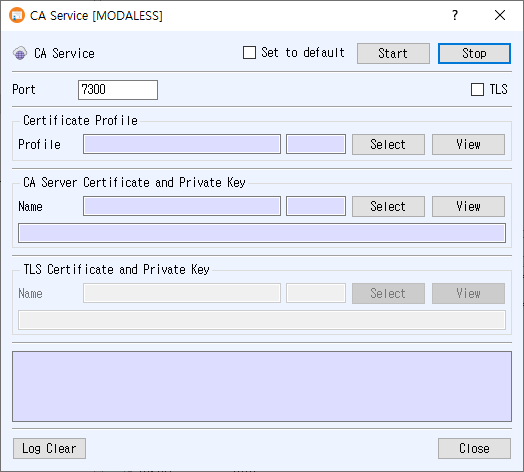
Open the dialog
Choose Service > CA Service from the main window.
Configure the service
- Enter the listener Port.
- In Certificate Profile, click Select to choose the profile used to issue certificates. The selected profile number and name appear in the fields; click View to inspect it.
- In CA Server Certificate and Private Key, click Select to choose the CA signing certificate and associated private key. Use View to inspect the certificate.
- To enable encrypted transport, check TLS. Select the TLS certificate and private key in the enabled TLS Certificate and Private Key section, and use View to inspect the certificate.
- Optionally check Set to default to reuse these settings the next time the dialog opens.
- Click Start. The Start button turns green when the CA service is running. Runtime messages appear in the log.
A certificate profile and CA certificate/private key are required. If TLS is enabled, its certificate/private key must also be available. The application reports an error when the port is empty, a selected record or key cannot be loaded, or the service fails to start. TLS certificates backed by PKCS#11 are not supported by this dialog.
Controls
- Stop stops the CA service.
- Log Clear clears the displayed log.
- Close closes the dialog.
- Set to default saves the port, TLS option, profile number, and CA/TLS certificate numbers. If unchecked when the service starts, the saved default is cleared.