CertMan Menu Manual
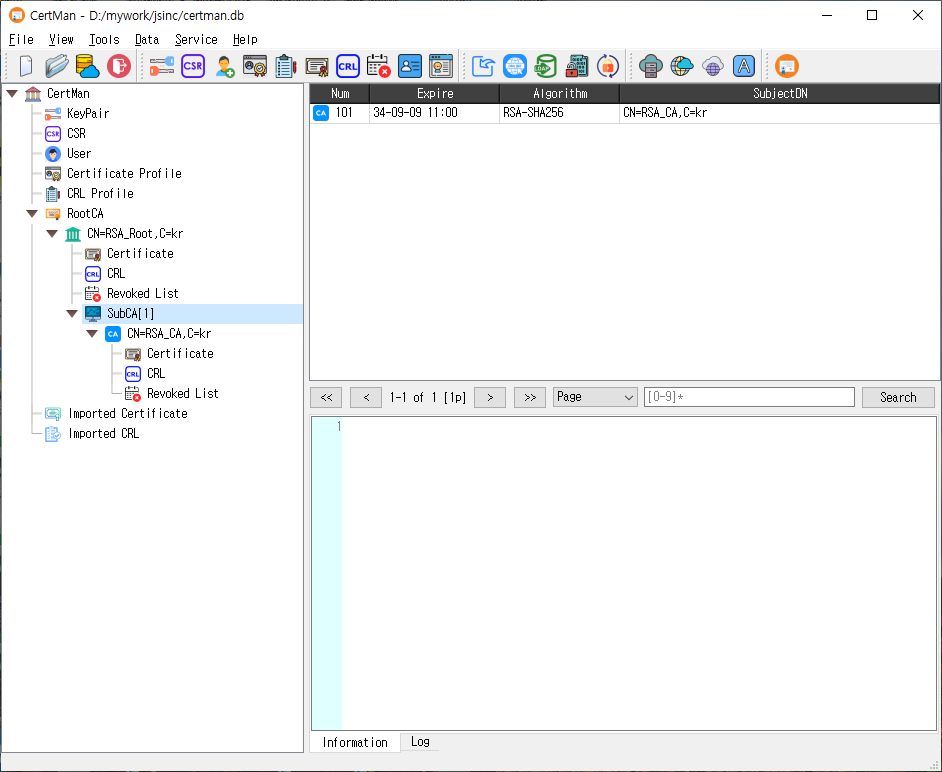
The screenshot shows File, View, Tools, Data, Service, and Help. The Server menu is added in the Pro edition, so it does not appear in this screenshot. Menu availability also depends on the active license. Toolbar visibility can be customized from View.
File
| Menu item | Shortcut | Description |
|---|---|---|
| New | Ctrl+N |
Create a new database. |
| Open... | Ctrl+O |
Open an existing database. |
| Remote Database | Ctrl+R |
Connect to a remote database. |
| Logout | Ctrl+T |
Disconnect from the current database. |
| Recent Files | — | Reopen a recently used database. Up to ten entries are maintained. |
| Quit | Ctrl+Q |
Exit CertMan. |
View
The View menu is available when a license is active. Its submenus contain checkable items for showing or hiding individual toolbar buttons:
- File ToolBar: New, Open, Remote Database, and Logout.
- Tool ToolBar: key generation, request and user creation, certificate and CRL profile creation, certificate/CRL creation, revocation, and the CA/Profile managers. Pro editions also include Make Config and Register Signer.
- Data ToolBar: Import Data, Get data from URI, Publish to LDAP, Set Passwd, and Change Passwd. Pro editions also include TSP Client.
- Server ToolBar (Pro): OCSP, TSP, CMP, REG, CC, and KMS server controls.
- Service ToolBar: TSP, OCSP, CA, and ACME service controls.
- Help ToolBar: Settings, Clear Log, Log, and About CertMan. Pro editions also include Server Status.
- Set Default: restore the default toolbar visibility settings. The application may ask to restart to apply toolbar changes.
These controls affect toolbar visibility; the corresponding commands remain available from their main menus.
Tools
| Menu item | Shortcut | Description |
|---|---|---|
| New keypair | Shift+F1 |
Generate a new public/private key pair. |
| Make Request | Shift+F2 |
Create a certificate signing request (CSR). |
| Register User | Shift+F4 |
Register a user. |
| Make Config (Pro) | Shift+F3 |
Generate configuration information. |
| Register Signer (Pro) | Shift+F5 |
Register a signer. |
| Make Cert Profile | Shift+F6 |
Create a certificate profile. |
| Make CRL Profile | Shift+F7 |
Create a certificate revocation list (CRL) profile. |
| Make Certificate | Shift+F8 |
Create a certificate. |
| Make CRL | Shift+F9 |
Create a CRL. |
| Revoke Certificate | Shift+F10 |
Revoke a certificate. |
| CA Manager | Shift+F11 |
Open the CA management window. |
| Profile Manager | Shift+F11 |
Open the profile management window. |
Data
| Menu item | Shortcut | Description |
|---|---|---|
| Import data | Ctrl+Alt+I |
Import supported data into the database. |
| Get data from URI | Ctrl+Alt+U |
Retrieve data from a URI. |
| Publish to LDAP | Ctrl+Alt+L |
Publish directory data to LDAP. This command is disabled in the unlicensed version. |
| Set Passwd | Ctrl+Alt+P |
Set a password for a private key. Disabled in the unlicensed version. |
| Change Passwd | Ctrl+Alt+C |
Change a private key password. Disabled in the unlicensed version. |
| TSP Client (Pro) | Ctrl+Alt+T |
Open the Time-Stamp Protocol client tool. |
Server (Pro)
The Server menu is present in the Pro edition. Each command opens the corresponding server setup or management window.
| Menu item | Shortcut | Description |
|---|---|---|
| OCSP Server | Shift+O |
Configure an Online Certificate Status Protocol (OCSP) server. |
| TSP Server | Shift+T |
Configure a Time-Stamp Protocol (TSP) server. |
| CMP Server | Shift+C |
Configure a Certificate Management Protocol (CMP) server. |
| REG Server | Shift+R |
Configure the registration server. |
| CC Server | Shift+A |
Configure the CC server. |
| KMS Server | Shift+K |
Configure a Key Management Service (KMS) server. |
Service
These commands configure or open the corresponding service. Service commands are disabled in the unlicensed version.
| Menu item | Shortcut | Description |
|---|---|---|
| TSP Service | Shift+T |
Set up the TSP service. |
| OCSP Service | Shift+O |
Set up the OCSP service. |
| CA Service | Shift+C |
Set up the CA service. |
| ACME Service | Shift+A |
Set up the Automatic Certificate Management Environment (ACME) service. |
Help
| Menu item | Shortcut | Description |
|---|---|---|
| Server Status (Pro) | — | Show server status information. |
| Settings | — | Open application settings. |
| Clear Log | F9 |
Clear the log output. Disabled in the unlicensed version. |
| Log | F10 |
Toggle log output. Disabled in the unlicensed version. |
| License Information | — | View license information. |
| Bug or Issue Report | — | Open the bug and issue reporting destination. |
| Q and A | — | Open the question-and-answer destination. |
| About CertMan | F1 |
Show information about CertMan. |
Notes
- Shortcuts use the platform's standard modifier names:
Ctrlmeans Control andShiftmeans Shift. - Some commands require an open database or suitable permissions and may be unavailable until those conditions are met.
- The source assigns
Shift+F11to both CA Manager and Profile Manager, and uses the same shortcuts for some Server and Service pairs (Shift+O,Shift+T,Shift+C, andShift+A). Which command responds can depend on the platform's shortcut handling. - Menu labels and behavior are based on the main-window implementation in
src/CertMan/mainwindow.cppandsrc/CertMan/mainwindow2.cpp.