Revoke Certificate Dialog Guide
This guide explains the Revoke certificate dialog. Select a certificate in the main window and choose Revoke Certificate from the context menu or Tools > Revoke Certificate (Shift+F10). A database connection is required.
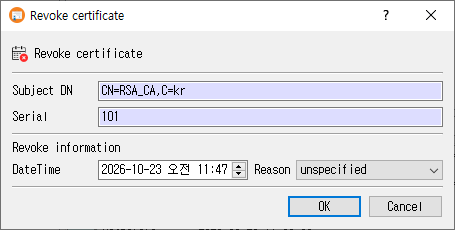
Revoke a certificate
- Confirm the read-only Subject DN and Serial shown for the selected certificate.
- Set the DateTime of revocation. It defaults to the current date and time.
- Choose a Reason. The default is
unspecified. - Click OK to record the revocation, or Cancel to leave without saving.
When confirmed, CertMan adds a revocation record for the selected certificate, changes its status to revoked, and refreshes the issuer's Revoked List. The reason and date are used when a CRL is generated.
Fields
| Field | Purpose |
|---|---|
| Subject DN | Read-only subject distinguished name of the selected certificate. |
| Serial | Read-only field labeled Serial. The current dialog populates it with the certificate's database record number; the saved revocation record uses the certificate's actual serial number. |
| DateTime | Revocation date and time. Initially set to the current local date and time. |
| Reason | Revocation reason recorded for the certificate. |
| OK | Save the revocation and update the certificate status. |
| Cancel | Close without recording a revocation. |
Available reasons include unspecified, keyCompromise, CACompromise, affiliationChanged, superseded, cessationOfOperation, certificateHold, removeFromCRL, holdInstruction, keyTime, and CAKeyTime.
Restrictions
- Select a certificate row before opening the command. The command is unavailable when the current list is not a certificate list.
- A self-signed Root CA certificate cannot be revoked through this command.
- For a CA certificate that is not a self-signed Root CA, revoke carefully: newly generated CRLs for that issuer can publish the revocation.
Related implementation
This guide is based on images/revoke_cert_dlg.png, src/CertMan/revoke_cert_dlg.ui, src/CertMan/revoke_cert_dlg.h, src/CertMan/revoke_cert_dlg.cpp, and the Revoke Certificate action in src/CertMan/mainwindow.cpp.