Publish to LDAP Dialog Guide
This guide explains the Publish to ldap dialog. Open it from Data > Publish to LDAP (Ctrl+Alt+L) for a selected certificate or CRL. The command requires a licensed version and an open database.
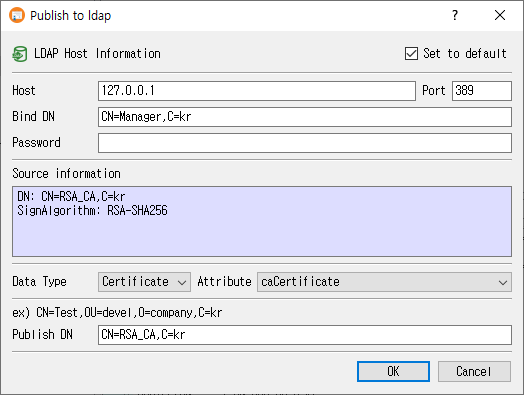
Publish an object
- Enter the LDAP Host, Port, Bind DN, and Password.
- Choose Data Type (Certificate or CRL).
- Choose an LDAP Attribute appropriate to the data type.
- Review or edit Publish DN. It is initially derived from the certificate subject or, for a CRL, its LDAP distribution point when available.
- Optionally keep Set to default selected to remember the host, port, and Bind DN.
- Click OK to bind to the LDAP server, create any missing parent entries, and publish the object. Click Cancel to exit.
Host, Bind DN, password, and Publish DN are required. Port defaults to 389 when blank. CertMan displays a success message after publishing.
Fields and choices
| Field | Purpose |
|---|---|
| Set to default | Save the host, port, and Bind DN in application settings for future use. The password is not included in these saved defaults. |
| Host | LDAP server hostname or IP address. Defaults to localhost when no saved host exists. |
| Port | LDAP server port; defaults to 389. |
| Bind DN | Distinguished name used to authenticate to LDAP. |
| Password | Password for the Bind DN; displayed as masked text. |
| Source information | Read-only summary of the selected certificate or CRL. |
| Data Type | Select Certificate or CRL. |
| Attribute | Certificate: caCertificate, signCertificate, or userCertificate. CRL: certificateRevocationList or authorityRevocationList. |
| Publish DN | LDAP distinguished name where the object is published. |
For a certificate, the initial Publish DN is derived from its subject DN. For a CRL, an LDAP CRLDP value is used as the initial value when present. You can edit the DN before publishing.
Notes
- The LDAP bind and publish operation modifies the target directory. Confirm that the selected attribute and DN match the directory schema and intended destination.
- The dialog creates missing parent entries before publishing the selected certificate or CRL.
- Saved defaults include connection host, port, and Bind DN, but do not store the password or Publish DN.
Related implementation
This guide is based on images/pub_ldap_dlg.png, src/CertMan/pub_ldap_dlg.ui, src/CertMan/pub_ldap_dlg.h, src/CertMan/pub_ldap_dlg.cpp, and the Data > Publish to LDAP action in src/CertMan/mainwindow.cpp.