Import Data Dialog Guide
This guide explains the Import data dialog. Open it from Data > Import data (Ctrl+Alt+I). A database connection is required.
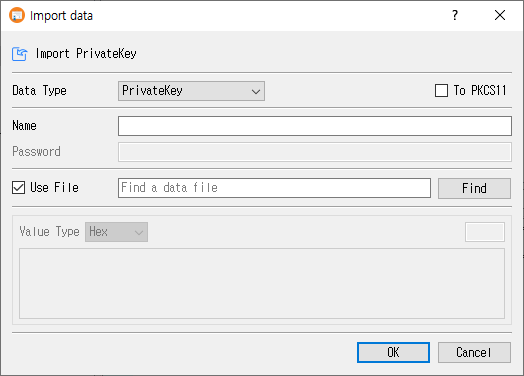
Import data
- Select a Data Type.
- Enter a Name when importing a private key, CSR, or PFX-related key pair.
- For an encrypted private key or PFX, enter its Password.
- Keep Use File selected and choose a file with Find, or clear it and paste data into the value editor.
- When pasting, choose Value Type (Hex or Base64) and enter the encoded data.
- Optionally select To PKCS11 or To KMS when importing a private key, or To KMS for a certificate when supported.
- Click OK to import, or Cancel to close.
On success, CertMan adds the imported object to the relevant list and reports Import was successful. The Name field is enabled for key, CSR, and PFX imports, but the source does not require a non-empty name.
Data types
| Data Type | Purpose and result |
|---|---|
| PrivateKey | Import an unencrypted private key and create a key-pair record with NotUsed status. |
| Encrypted PrivateKey | Decrypt with Password, then import the private key as a key pair. |
| Request(CSR) | Parse a CSR and add it to the Request list using the entered name. |
| Certificate | Parse and add a certificate to the imported certificate list. |
| CRL | Parse and add a CRL to the imported CRL list. |
| PFX | Decode a PKCS#12/PFX bundle using Password, then import its certificate and private key. The key pair is marked Used. |
The password field is enabled for Encrypted PrivateKey and PFX. The name field is disabled for Certificate and CRL.
Source selection and value format
| Control | Purpose |
|---|---|
| Use File | Read data from a selected file. This is selected by default. |
| Find | Select an input file. The file filter is adjusted for the chosen data type. |
| Value Type | Select Hex or Base64 for pasted input. |
| Value editor | Paste the encoded object when Use File is cleared. The adjacent length field shows the calculated data length. |
CertMan also accepts a file dragged onto the dialog. With Use File enabled, the dropped path fills the file field; with it disabled, file bytes are decoded into the selected text format in the editor.
Key storage options
- To PKCS11 is available only for private-key imports and when the PKCS#11 provider is configured and loaded. The import implementation supports RSA, ECDSA, and DSA for PKCS#11 storage.
- To KMS is shown in Pro. It can store supported private keys or certificates through the configured KMIP/KMS service.
- Importing a CSR or CRL to KMS is not supported by this dialog. The dialog reports this if To KMS is selected for either type.
- In the unlicensed version, only RSA private keys can be imported.
- When CertMan private-key encryption is enabled, imported internal private keys are encrypted before they are saved.
Related implementation
This guide is based on images/import_dlg.png, src/CertMan/import_dlg.ui, src/CertMan/import_dlg.h, src/CertMan/import_dlg.cpp, and the Data > Import data action in src/CertMan/mainwindow.cpp.